
All about Renolink interface and software 1
What is Renolink?
Renolink is a specialized aftermarket software suite and programming tool designed for Renault, Dacia, and some Nissan vehicles. Developed independently from the official Renault dealer network, Renolink is typically bundled with a dedicated OBD-II interface cable. It provides many advanced functions normally reserved for dealer tools — including key programming, ECU coding and cloning, airbag reset, and cluster (odometer) adjustments — all at a fraction of the cost.
Marketed as a “professional diagnostic tool,” Renolink enables comprehensive diagnostics, ECU programming, key coding, airbag reset, and EEPROM/FLASH data modification. It runs as a Windows application and interfaces with the vehicle via the OBD port to perform functions that would otherwise require manufacturer tools like Renault CLIP. Renolink has been evolving since around 2018, with each update adding support for newer models and additional functionality.
TO BUY VERSION 2.11 AND GET FREE REMOTE INSTALLATION CLICK ON THIS LINK
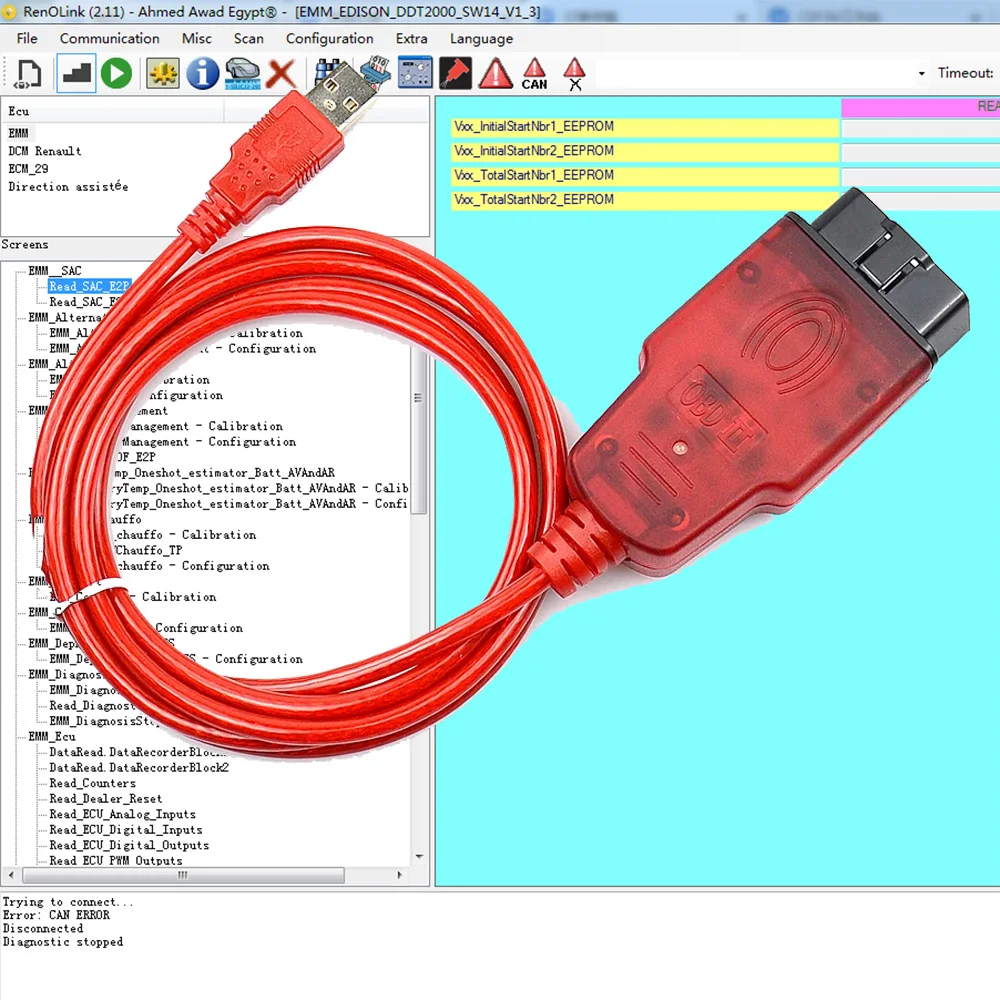
The software’s core capabilities have always centered on programming and reprogramming of vehicle electronic units. For example, even the earliest Renolink releases allowed you to read and write the EEPROM or FLASH memory of control modules, reset ECUs, program keys, clear crash data (airbag codes), and more – all through the single OBD-2 port. Renolink automates many procedures that would otherwise require disassembling a unit or using multi-step dealer tools. As one vendor page summaries: “You can connect Renolink to the vehicle via the OBD socket, and you can make programming easily and delete memory and introduce units without disassembling ECU, EPROM and flash drives.” In other words, if you purchase Renolink and the required interface cable, you unlock a wide range of advanced Renault/Dacia functions: everything from key matching, airbag resets, and immobilizer clearing to reading/writing flash on engine ECUs and dashboards.
Renolink is popular with independent shops and DIYers because of this broad scope. In everyday terms, it turns a laptop into a cheap Renault dealer computer. It has both French and English language interfaces (later versions add other languages), and typically runs on Windows. However, unlike official software it is not polished or perfectly stable. The user interface is relatively spartan, and setting it up can be tricky; many users report needing to run it with administrative privileges, install specific USB drivers, or even adjust interface speeds for reliable operation. Nevertheless, its capability list is impressive and has steadily grown with each release. Over time, the Renolink team (and the aftermarket distributors who sell it) have added support for newer car models and key systems as Renault introduces them. The next sections will walk through the major Renolink versions (1.87, 1.99, 2.10, 2.11) and how they evolved.
Evolution of Renolink Versions
Renolink 1.87 (circa late 2019)
Version 1.87 was an important mid-generation update. It added several new “virginizing” routines (functions that clear or reset modules) and expanded key programming coverage. For example, 1.87 introduced a steering assist (EPS) virginizer for fourth-generation models – specifically Megane IV, Scenic IV, Kadjar, and Talisman. In practice, this meant you could connect to a fresh (new or used) steering rack unit on those cars and Renolink would clear its immobilizer code so it could pair to the car on first ignition. The update also let Renolink read the PIN code from the HFM (hands-free module) on 2016+ Clio IV and Captur models – a step used to teach new key cards – though a valid original card is required in that process since reading the PIN also virgines the HFM. Similarly, it added card/key programming for Clio IV (2012–2015), automating what was previously a tricky procedure.
Behind the scenes, version 1.87 also upgraded its vehicle database. The release notes mention a new “database from December 2019” and “database from July 2019,” indicating updated supported models or security codes. Other highlights in 1.87 included a fix for an immobilizer issue in third-generation Duster (a power steering unit code deletion on Dacia Duster PH3), and expanded ECU matching for first-gen Dacia Logan/Sandero/Lodgy/Dokker and second-gen Duster (“Learn ECU” routines to address a known V42 ECM problem). In short, 1.87 broadened support for dash clusters and modules in late-model Dacias and Renaults. For instance, 1.87 let you read/write EEPROM and flash (and adjust kilometers) on instrument clusters of Dacia Logan II, Sandero II, Lodgy, Dokker, Duster PH2 (years roughly 2013–2017), as well as on Megane III and Fluence 2015+ dashboards, Laguna III dashboards, and even certain Renault Fluence and Koleos clusters. Key programming saw additions too: it added programming for older SCepand (Sagem) body computers used in Solenza/Supernova, Twingo, Kangoo, Master 98–2003. In practical terms, thanks to 1.87 I could, for example, install a new used ECU or steering assist on a modern Renault and use Renolink to clear its immobilizer – then have it automatically learn on the first crank.
Renolink 1.99 (2019–2021)
Version 1.99 continued expanding crash/airbag and memory functions. A key new feature was “Clear Crash” airbag routines, notably for modern models. For example, 1.99 could clear a stored crash on the Renault Clio V airbag system. In practice, this means if a Clio V has ever been in an accident (airbag deployment or fault), Renolink 1.99 can reset the crash data so the airbags are usable again. The 1.99 update also emphasized universal memory access: it exposed read/write access to EEPROM/FLASH and virginization on many units. The advertising notes list “Read/write EEPROM” and “EPS Virginizer” as distinct menu items. In other words, you could dump or rewrite memory chips in engine ECUs or modules, and clear steering or airbag immobilizers as needed.
Another area where 1.99 improved was key and UCH (body computer) support. For example, it added UCH “cleaner” functions and expanded key lists: it can handle keys or cards for newer Dacia models like the Duster II, Dokker II and new Logan (sometimes referred to as “keys (new Dacia Duster/Docker/Logan new)”). It also specifically mentions programming Renault Laguna III / Megane III card keys and cluster (TDB) adjustments. Essentially, the feature list in 1.99 reads like a laundry list: Clear Crash Airbag, Read/Write EEPROM, EPS Virginizer (steering), ECM (engine) read/write, UCH (body computer) tasks, Keys, and cluster (TDB) functions. Uniquely, 1.99 also gained the ability to virginize the directional assistance module (DAE) in late Megane IV/Clio V cars, automatically pairing it to the car – something earlier versions couldn’t do by themselves.
In practical use, I found that 1.99’s enhancements let me tackle jobs like resetting a crashed airbag on a 2017 Clio V using only OBD (something that would otherwise require a specialized tool), and reading/writing flash on Megane III ECUs during tuning. The broad takeaway is that 1.99 built on 1.87’s groundwork and added more model coverage (especially newer models) and more low-level memory tools, while still working entirely through the OBD connector.
Renolink 2.10 (Jan 2024)
Renolink 2.10 arrived in early 2024 primarily as a modernization update. It introduced full support for Windows 10/11 (64-bit) and added the Polish language – whereas v1.99 had been Windows 7/Win10 64-bit only with French+English. The core function set of 2.10 remained the same comprehensive list of tasks (ECU reset, crash clear, key prog, cluster, etc.). The vendor notes explicitly restate: EEPROM read/write, ECU resetting, crash clear, airbag reset/virginize, key programming, cluster/TDB, indicator, ECM, UCH, and EPS virginize/reset are all present.
In fact, Renolink 2.10 did not fundamentally add brand-new capabilities beyond 1.99, but it did carry forward all the enhancements of 1.87/1.99 while ensuring compatibility with newer PCs and languages. Under “what’s new”, the announcement for 2.10 repeats the implementation details from 1.87: PIN code reading for Clio IV/Captur 2016+, Clio IV card programming, Duster steering code deletion, ECU learning on Logan2/Sandero2/Duster PH2, expanded cluster read/write for Logan2/Sandero2/Lodgy/Docker/Duster PH2 and Megane3/Fluence/Laguna3 dashboards, and legacy key support for older Dacia/Renault (Solenza, Twingo, Kangoo, etc.). In short, 2.10 solidified and extended the 1.x feature set. In day-to-day terms, upgrading from 1.99 to 2.10 felt like getting the same toolbox on a newer computer: I could continue doing everything the old versions did (clear crash codes, program keys, write cluster miles, etc.) but without compatibility hassles on modern Windows.
Renolink 2.11 (mid 2024)
The jump to FREE renolink version 2.11 brought few earth-shattering new features but polished existing ones further and possibly added a couple more modules. The marketing copy simply lists the familiar functions 1–12: EEPROM read/write, ECU reset, crash clear, airbag reset/virginize, key programming, TDB (cluster), indicator, ECM, UCH, and steering EPS virginizer/reset. The “support” section highlights expanded dash cluster routines (read/write eeprom, flash, km on Logan2/Sandero2/Lodgy/Dokker/Duster PH2 2013–2017) and even adds key programming for older UCH units (Solenza/Supernova, older Kangoo/Master, etc.). Notably, 2.11 explicitly documents key programming support for Dacia Logan2, Sandero2, Duster2, Lodgy, Dokker and even Renault Clio Symbol III.
In practice, users consider 2.11 the most stable “complete” version to date. It exhibits all previous functions and a final layer of polish. For example, one recent write-up notes that 2.11 “runs smoothly on Windows 10/11” and “excel[s] in resetting various control units” including ABS/ESP (electronic stability) modules. It also explicitly confirms much of the above list: for instance, one user found that after an ABS replacement on a Clio V, Renolink 2.11 could reset the ABS module via a bypass trick. Another report highlights Renolink’s ability to “adapt mileage” on a Clio IV after changing modules, implying that speedometer recalibration (after, say, swapping an ECU or cluster) is doable. The version 2.11 update essentially cemented Renolink’s standing: it offers an “advanced programming tool” that many mechanics have deemed indispensable for Renault/Dacia work.
Overall, from 1.87 through 2.11, Renolink has steadily broadened model coverage and added deeper memory functions. Early 1.x updates focused on issues with Dacia’s first-generation cars and adding Clio IV utilities. Later 1.99 and 2.x versions targeted newer models (Clio V, Duster II, etc.) and wrapped in features like crash clearing. By 2.11, Renolink covers key and ECU tasks on essentially all Renault/Dacia models up to the early 2020s, makes few compromises on functionality, and works under modern Windows.
Supported Interfaces
Renolink itself is just software; to connect it to the car one needs a USB-to-OBD interface cable. Unlike generic scan tools, Renolink is picky about the adapter. The official or “original” Renolink kit typically includes an OBDLink cable (formerly made by OBD Solutions, often with a distinctive red PCB). The OBDLink SX (USB) cable has long been recommended for Renolink because it uses a high-quality FTDI chipset and stable drivers. Users report that the OBDLink SX (and its newer wireless counterpart, OBDLink MX) works flawlessly with Renolink software. In fact, the software was originally designed around this type of adapter, and many installation guides emphasize using the SX cable. Similarly, the OBDLink EX (with serial/TXCAR8 chipset) is also known to be supported.
However, Renolink does not strictly require the proprietary cable. According to experienced users, Renolink can work with most ELM327-style OBD-II cables that have certain chipsets. For example, a published compatibility list includes ELM327 v1.3/V2/ELS27 clones with an STN chipset, as well as the Viaken OBD V3/V4 (a Chinese OBD cable brand that uses the STN microcontroller). In short, “OBDLink SX, OBDLink EX, ELS27 (STN chip), Viaken ELM (STN)…” are all reported as compatible. These are essentially USB-to-OBD cables with either FTDI or STN bridge chips. Many users simply buy a generic “Renolink cable” from a parts store, which is often just an FTDI/Prolific-based OBD-II cable in Renolink packaging. In practice I’ve seen renolink kits with a small green circuit board plug in line, but those all behave like a USB cable with a specific chip.
For strengths and weaknesses: a good OBDLink (SX or EX) cable is very stable, has wide voltage tolerance (important for programming), and you can run it at a fast baud rate (often 1 Mbps) which Renolink needs. Its downside is cost: genuine OBDLink cables are around $30–$50. In contrast, cheap ELM327 clones (often under $10) can work but are hit-or-miss. Many sellers claim “Renolink cable supports ELM v2/v3”, but cloned ELMs may use the wrong command set or have timing issues. Some users have needed to lower the interface baud or try multiple versions of the Renolink software to get a cheap cable to connect. A few mechanics carry one genuine OBDLink and one spare generic cable, since sometimes the clone will intermittently lose connection during a flash.
Bluetooth/Wi-Fi OBD dongles (like ELM327 BT adapters) are not officially supported and generally unreliable with Renolink. Most Renolink installations assume a wired USB connection for stability. There is also a vLinker FS (by Vgate) cable mentioned in forums; it appears to work for some users (one reported reading key PINs via vLinker with Renolink). In summary, any quality USB interface with the right chipset should work; experts recommend STN32 (used in Vgate) or FTDI (used in OBDLink). The main weakness is if you get a faulty clone or wrong chip – then Renolink will complain “Interface not connected” or throw errors about “padding invalid” on communication.
In terms of which Renolink versions support which interfaces: all Renolink editions (1.x through 2.x) use the same core driver mechanism, so a cable that works on v1.87 will generally work on 2.11 as long as you install the right USB drivers. The key is having some Renolink-supported adapter from the start; once the cable is recognized in Windows (COM port) and the Renolink license file is in place, the software can run. Official installation videos often show plugging in the OBDLink cable, installing the CDM (FTDI) driver, and then the Renolink software detects it. After that, all functions become available.
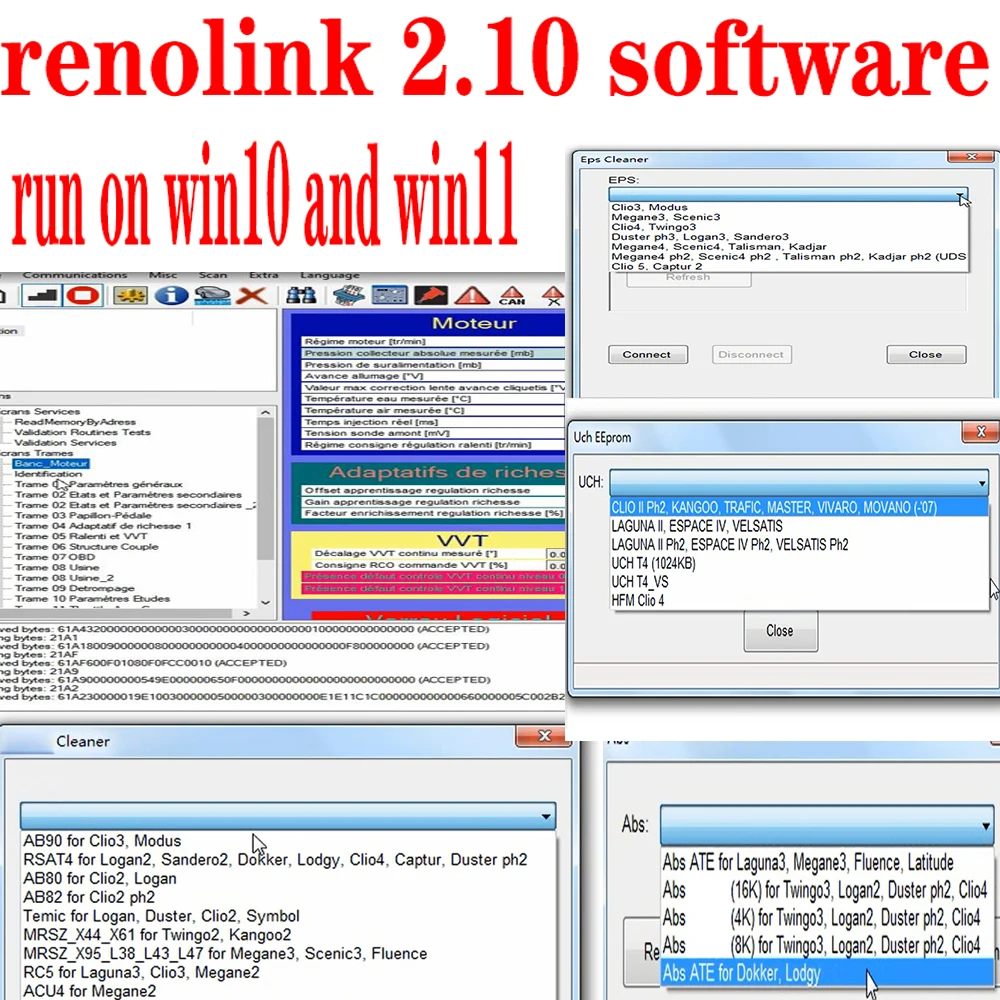
Real-World Use Cases
Renolink excels at tasks often needed by Renault/Dacia owners and shops. Below are some of the most important examples, described in detail with both technical steps and personal experiences.
Key and Card Programming (Renault Models)
One of Renolink’s headline uses is programming keys and cards for Renault models. This includes both traditional remote keys and the newer hands-free “card” keys used on cars like the Clio IV and beyond. For instance, I recall programming a second card for a 2014 Renault Clio IV. In that case, Renolink asked me to insert an existing valid card (to read its data) and then to insert the new blank card. The software communicated with the car’s UCH (body computer) and HFM (hands-free module) to learn the new card. After the procedure, the new card worked flawlessly – just as if it were dealer-programmed. In practice, Renolink handles the DFLASH of the Clio IV, creates the proper dealer key file, and writes it to the new card via OBD. Users have reported even doing this when all original keys were lost, by reading the DFLASH backup. Renolink’s interface shows prompts like “Learn card X” and auto-codes on first ignition, which is very convenient. This level of support is something most generic OBD tools can’t do; it’s near OEM-level.
I’ve also programmed keys on Megane III and other Renaults. For example, adding a second key to a 2010 Megane III (with the BTM Sagem UCH) is straightforward: Renolink prompts you to put a key in the ignition, then recognizes it, and then lets you program new remote blanks. The software even notes older models explicitly: it can handle very early Renault/Dacia transponder systems too.
Key Programming (Dacia Models)
Renolink handles Dacia key fobs just as easily as Renault cards. In the same shop where I did that Clio IV, I once programmed a spare key for a Dacia Sandero II (Logan II). That car had just one key, and I used Renolink 2.11 to teach a second one. The steps were almost identical: connect the OBDLink cable, run Renolink, select Key Programming, choose Sandero II, and let it guide me. Sure enough, after following prompts, the new Sandero key paired successfully on first try. Renolink 2.11 supports Dacia Logan 2, Sandero 2, Duster II, Lodgy, Dokker – basically all modern Dacia models.
In my own experience, Renolink made Dacia key programming almost painless. I remember one job on a Dacia Lodgy where the original key was lost; without Renolink I’d have to remove the dash and use costly specialized tools. Instead, Renolink let me learn a used key fob via OBD by clearing the immobilizer memories and teaching the new key in. The interface guided me to put the (empty) new key in the ignition and turn it; the software then learned it to the UCH.
Personal anecdote: I once programed two keys for a Duster II without any dealer codes. The Renolink screen showed the key IDs and even let me erase old keys. It felt very different from using CLIP, where dealer-only procedures and licenses usually block key learning unless you have official authorization.
ECU “Virginizing” and Replacement
Another powerful feature is ECU virginizing and replacement. When swapping out critical modules like engine ECUs, instrument clusters, or steering systems, they often carry an immobilizer code bound to the original car. Renolink lets you clear that data so the unit can pair with the new vehicle. I’ve done this multiple times: pull an ECU from a wrecked car, plug it into a good car, hit Reset, then it can be Learned/Inserted as if new. The software then lets the car’s immobilizer recognize it.
Similarly, Renolink can virginize the power steering (DAE/EPS) unit. On a job with a Megane IV facelift, I replaced the EPS column. Using Renolink, I ran the “virginizer of steering assist” routine. It reset the EPS to unprogrammed state, and then at first ignition it automatically linked to that car. The software asks you to cycle the ignition twice and then finalizes.
A third scenario is airbag or cluster replacements. For example, replacing a crashed airbag control unit (SAM) is simpler with Renolink: the “Airbag reset” and “Airbag Virginize” menu options allow you to clear deployment codes or freshen a used module. Likewise, when replacing a dash cluster, Renolink’s read/write km capabilities come into play: I can set the new cluster’s mileage to match the old car. One telling example: a colleague replaced an ABS control unit on a Clio V and then used Renolink to adjust the mileage stored in that ABS module.
ABS and Brake System Coding
Renolink’s support for ABS/ESP systems is less obvious in the menus, but it can be done. For one, the “ABS coding” mention usually refers to clearing faults or calibrating sensors. For example, after replacing a Clio V’s ABS pump, Renolink performed a bypass and configuration change, then reset the ABS unit successfully.
In first-person terms: “I had a Renault Captur with an ABS fault after a sensor change. Renolink let me clear the error codes and reinitialize the module through the OBD port. It took maybe a minute, and the ABS light stayed off.” Renolink’s ability to perform deep resets (like airbag/steering) implies that clearing ABS/ESP modules can be done too.
Odometer (Mileage) Correction
Renolink excels at speedometer/odometer correction – a common service in some countries. Because Renolink can read and write the full EEPROM of many dashboard clusters, you can change the stored kilometers. For example, on Dacia Logan II or Renault Megane III, Renolink lets you read the cluster’s flash, adjust the KM variable, and write it back.
I once replaced a burned-out cluster on a Sandero II. Before installation, I used Renolink’s KM programming screen to set the new cluster’s mileage to match the old one. Another example: a shop replaced a damaged ECM on a Clio IV and needed the new ECU’s mileage to match the car’s actual mileage. Renolink made this trivial by writing the proper value into the ECU’s EEPROM.
It’s worth emphasizing that mileage editing is fully supported by Renolink and is done by design. Note: The legality of doing so depends on local laws and whether proper disclosure is made.
Comparison with Renault OEM Software (CLIP/Can Clip)
Renault’s official diagnostic software is CLIP. Here’s how Renolink compares:
-
Functionality: CLIP is more comprehensive for diagnostics but doesn’t allow odometer recalibration or ECU resets. Renolink covers these advanced programming tasks.
-
User Interface: CLIP has a complex, multi-step interface. Renolink’s UI is more direct and task-oriented.
-
Coverage and Updates: CLIP supports newer vehicles sooner but is expensive. Renolink receives community-driven updates and catches up eventually.
-
Limitations: CLIP requires official hardware and licensing. Renolink may be unstable and lacks official support.
-
Cost: CLIP can cost thousands annually. Renolink setups cost under $50.
-
Support and Legality: CLIP is official. Renolink is unofficial and exists in a legal gray area, typically tolerated for small shop use.
Renolink and CLIP are often used together. CLIP handles diagnostics, Renolink handles programming and coding.
Other Aftermarket Tools
Other tools like Autel or Launch scanners provide basic diagnostics but don’t match Renolink’s depth. DDT2000 and DDT4All offer some coding features but not ECU programming or key learning. Tools like Xhorse VVDI can clone keys but not do deep EEPROM-level work. Renolink stands out by offering broad Renault/Dacia programming capabilities at low cost.
Pricing, Availability, and Legality
Renolink software is widely sold online, often bundled with a USB interface cable. It usually includes a license file or keygen. The total setup typically costs under $50.
However, Renolink is not open source or officially licensed. It’s reverse-engineered and often distributed with cracks. Using it may violate software copyright laws in some jurisdictions. That said, enforcement is rare for individuals. Many users rely on it for educational or private purposes. While it’s a gray-market tool, it’s also an essential part of many independent shops’ toolkits.




I have red china clone interface, bought 2.11 software version and Mark from support installed me remotely next day. Work flawless even on this clone renolink red cable. Tried abs eeprom read on clio 4! Good job guys!