
-
×
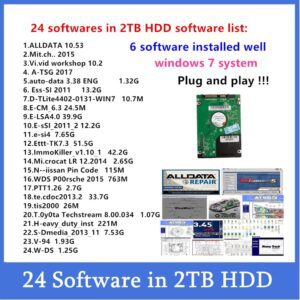 2022 Auto Repair Software Alldata 10.53 Vivid workshop data Elsa.Win6.0 ATSG Auto..data 3.45 Mit..chell install well on 2TB HDD
1 × $219
2022 Auto Repair Software Alldata 10.53 Vivid workshop data Elsa.Win6.0 ATSG Auto..data 3.45 Mit..chell install well on 2TB HDD
1 × $219
Subtotal: $219

If you found this tool by searching for:
“ODIS uninstall problem”, “ODIS won’t install”, “ODIS remove completely”, “clean ODIS installation”, “ODIS setup failed fix”, or “ODIS delete registry entries” —
then you’re in the right place.
$18
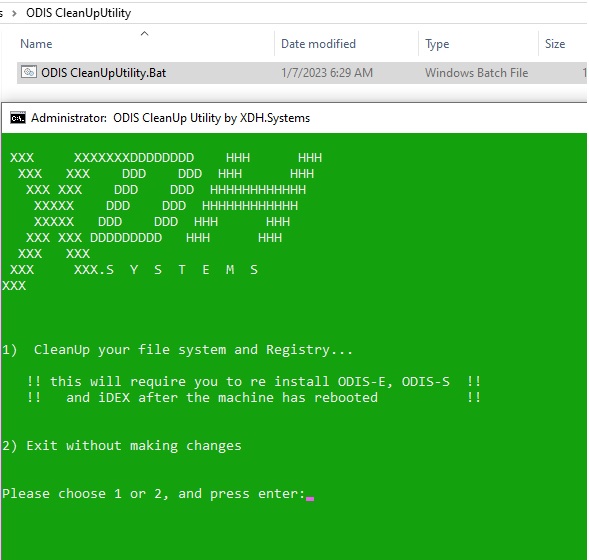
ODIS Cleanup Utility is a simple but powerful tool designed to completely remove all traces of ODIS (Offboard Diagnostic Information System) from your computer.
If you’ve ever had issues reinstalling or updating ODIS — like the setup freezing, installation errors, or ODIS not launching after uninstall — this tool is the perfect solution.
The ODIS Cleanup Utility automatically:
Deletes all leftover ODIS program files and folders
Cleans hidden configuration and log directories
Removes registry entries related to ODIS and VAS software
Prepares your system for a clean, fresh ODIS installation
After running it, your system will be like ODIS was never installed — allowing you to install a new version smoothly without any errors.
Many users experience problems when trying to reinstall or update ODIS, such as:
“ODIS already installed” message even after uninstall
“ODIS setup failed” or “installation interrupted” errors
ODIS not starting or crashing after reinstall
Old versions interfering with new updates
The ODIS Cleanup Utility fixes all of these by completely cleaning old files and registry entries that the default uninstaller misses.
Close all ODIS-related programs
Run ODIS Cleanup Utility as Administrator
Follow instructions and Wait a few seconds while it removes all ODIS components
Reboot your PC
Install the new version of ODIS without errors
No complicated steps — just run and clean.
🔍 If you found this tool by searching for:
“ODIS uninstall problem”, “ODIS won’t install”, “ODIS remove completely”, “clean ODIS installation”, “ODIS setup failed fix”, or “ODIS delete registry entries” —
then you’re in the right place. This tool solves exactly those issues.
Windows 7 / 10 / 11 (32 & 64 bit)
Works with all ODIS versions (ODIS-S, ODIS-E, VAS 6154, etc.)
If you’re stuck reinstalling ODIS, don’t waste time manually cleaning files and registry entries.
Use ODIS Cleanup Utility — the fast, safe, and effective way to prepare your system for a clean ODIS installation.





There are no reviews yet.