

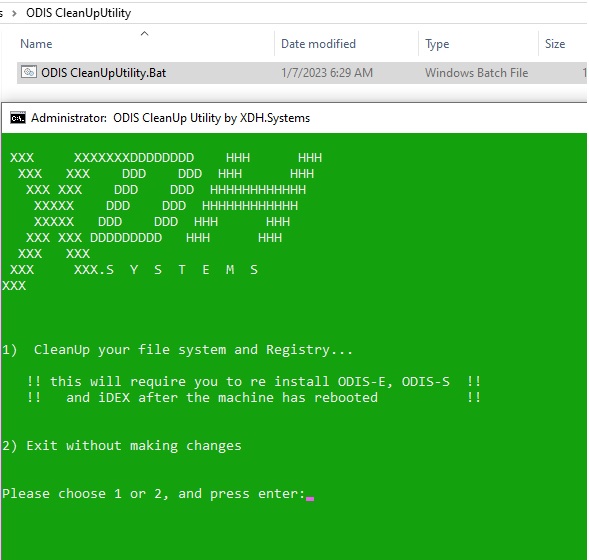
ODIS cleanup utility
If you found this tool by searching for:
“ODIS uninstall problem”, “ODIS won’t install”, “ODIS remove completely”, “clean ODIS installation”, “ODIS setup failed fix”, or “ODIS delete registry entries” —
then you’re in the right place.
$18
🧹 Fix ODIS Installation Problems Instantly
ODIS Cleanup Utility is a simple but powerful tool designed to completely remove all traces of ODIS (Offboard Diagnostic Information System) from your computer.
If you’ve ever had issues reinstalling or updating ODIS — like the setup freezing, installation errors, or ODIS not launching after uninstall — this tool is the perfect solution.
🚗 What It Does
The ODIS Cleanup Utility automatically:
-
Deletes all leftover ODIS program files and folders
-
Cleans hidden configuration and log directories
-
Removes registry entries related to ODIS and VAS software
-
Prepares your system for a clean, fresh ODIS installation
After running it, your system will be like ODIS was never installed — allowing you to install a new version smoothly without any errors.
🧠 Why You Need It
Many users experience problems when trying to reinstall or update ODIS, such as:
-
“ODIS already installed” message even after uninstall
-
“ODIS setup failed” or “installation interrupted” errors
-
ODIS not starting or crashing after reinstall
-
Old versions interfering with new updates
The ODIS Cleanup Utility fixes all of these by completely cleaning old files and registry entries that the default uninstaller misses.
⚙️ How It Works
-
Close all ODIS-related programs
-
Run ODIS Cleanup Utility as Administrator
-
Follow instructions and Wait a few seconds while it removes all ODIS components
-
Reboot your PC
-
Install the new version of ODIS without errors
No complicated steps — just run and clean.
🔍 If you found this tool by searching for:
“ODIS uninstall problem”, “ODIS won’t install”, “ODIS remove completely”, “clean ODIS installation”, “ODIS setup failed fix”, or “ODIS delete registry entries” —
then you’re in the right place. This tool solves exactly those issues.
✅ Compatible With
-
Windows 7 / 10 / 11 (32 & 64 bit)
-
Works with all ODIS versions (ODIS-S, ODIS-E, VAS 6154, etc.)
💬 Summary
If you’re stuck reinstalling ODIS, don’t waste time manually cleaning files and registry entries.
Use ODIS Cleanup Utility — the fast, safe, and effective way to prepare your system for a clean ODIS installation.
YOU MUST RUN THIS .BAT FILE AS ADMINISTRATOR!







There are no reviews yet.