
How to Find Idle Maps in EDC16 1
A deep, practical explanation based on real calibration patterns – not myths
When someone asks “how do I find idle maps in EDC16?”, the question almost always comes from real hands-on work: WinOLS open, hundreds of maps detected, and no obvious label saying IDLE RPM.
This article is written exactly in that context — as if I am answering you directly, step by step in logic, not in shortcuts.
This applies to all Bosch EDC16 ECUs: PSA, VAG, BMW, Fiat, Opel, Renault, Iveco, light-duty and medium-duty diesel. The principles do not change, only the layout does.
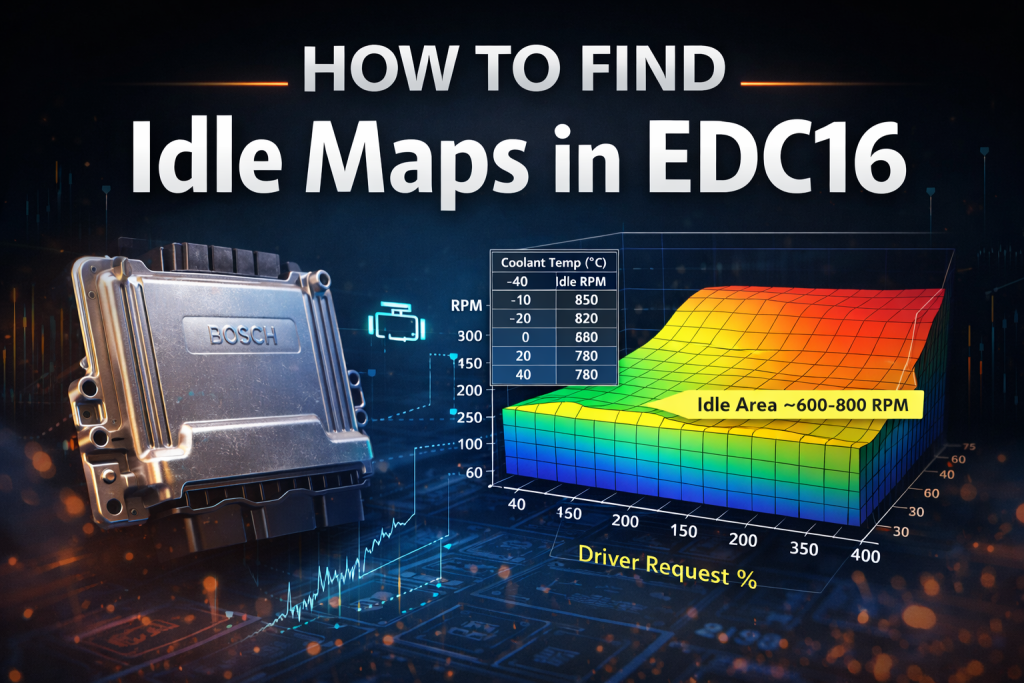
1. Why “idle RPM map” usually does not exist in EDC16
The first thing that must be clear — and this is where many beginners get stuck — is that EDC16 does not normally command idle by RPM directly.
EDC16 is a torque-based ECU.
That means:
-
The ECU does not say: “hold 820 RPM”
-
It says: “request X torque to keep engine running”
-
RPM becomes the result, not the command
Because of this:
-
Idle control is spread across multiple maps
-
No single map can be called “the idle map”
-
Idle RPM is the outcome of torque, fuel, air, temperature, and limiters
If you understand this, everything else starts to make sense.
2. What “idle maps” really are in EDC16
In EDC16, idle behavior is formed by three main groups of maps:
-
Idle-related target or correction maps
-
Torque → fuel / torque → IQ maps at low RPM
-
Limiters that dominate at idle
You are not searching for one map.
You are searching for a group of maps that overlap at low RPM and zero driver request.
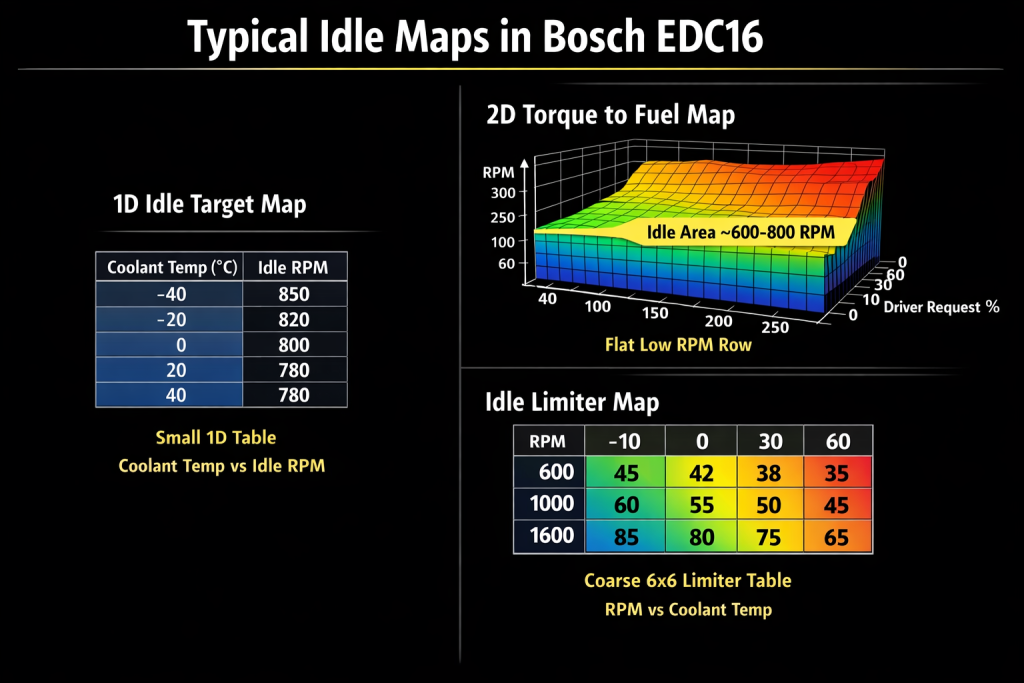
3. Small 1-D maps: the first place idle hides
How these maps look in practice
These are some of the most reliable idle indicators across all EDC16 files.
Typical characteristics:
-
Very small tables (often 6–12 values)
-
One axis only (1×N or N×1)
-
Axis values increase steadily
-
Table values are flat or gently rising
These maps usually represent:
-
Idle torque target vs coolant temperature
-
Idle fuel correction vs temperature
-
Cold idle stabilization
-
Warm idle smoothing
Example (conceptual layout)
Axis (temperature): -40 -20 0 20 40
Values (idle factor): 52 55 58 60 60
In WinOLS:
-
These maps often look “too simple”
-
They are easy to ignore
-
But they are core to idle behavior
Why this applies to all EDC16
Cold engines need more torque to idle smoothly.
Hot engines need less.
That logic is universal — Bosch reused it everywhere.
4. Flat low-RPM rows in 2-D maps (this is one of the strongest clues)
Now we reach one of the most important visual patterns.
Where to look
Open large 2-D maps such as:
-
Torque → fuel (IQ)
-
Driver wish
-
Requested torque maps
Then:
-
Look at the lowest RPM rows
-
Usually around 600–1000 RPM
What you will see
Often, one RPM row will look like this:
While higher RPM rows vary strongly.
This flat row exists because:
-
At idle, driver pedal input is ignored
-
ECU wants a fixed torque value
-
Stability is more important than response
Key point
If you see a perfectly flat row at low RPM, you are almost certainly looking at an idle-related region.
This pattern appears in:
-
PSA EDC16C34
-
VAG EDC16U1 / U31
-
BMW EDC16C35
-
Fiat / Opel EDC16
Different shapes, same logic.
5. Torque → fuel maps: idle hides inside them
Many people expect idle fuel to be in a separate table.
In EDC16, it often is not.
Instead:
-
Idle torque request is fed into the same torque → fuel conversion maps
-
The idle region is simply the lowest RPM / lowest torque corner
Conceptual example
The ECU just keeps requesting torque that falls into that idle plateau.
6. Limiters: why idle changes sometimes do nothing
This is a critical point and often misunderstood.
In EDC16:
Limiters always win.
You can find a perfect idle-related map and still see:
-
No RPM change
-
Or unstable idle
-
Or ECU overriding your expectation
Why?
Because:
-
Torque limiters
-
Fuel limiters
-
Air/smoke limiters
-
Temperature limiters
All apply before final torque is delivered.
How idle limiters look
Typical limiter maps:
-
Low resolution (6×6, 8×8)
-
Blocky surfaces
-
Often indexed by RPM and temperature
They do not look smooth or “tuned”.
They look restrictive — because they are.
Visual clue
If a map looks:
-
Rough
-
Coarse
-
Protective
It is probably a limiter affecting idle.
7. Temperature-based logic is everywhere in idle control
Idle behavior changes dramatically with:
-
Coolant temperature
-
Intake air temperature
-
Electrical load (AC, alternator)
EDC16 handles this by:
-
Layering temperature-indexed maps
-
Blending corrections together
That is why:
-
Many idle-related maps use temperature axes
-
They are often small and easy to miss
You will see this in every EDC16, regardless of brand.
8. Why map locations are NEVER identical (deep check answer)
Even within the same ECU type:
-
Different software numbers
-
Emissions revisions
-
Gearbox type
-
Market version
All change:
-
Map order
-
Axis scaling
-
Presence of helper maps
So:
-
A PSA EDC16C34 idle-related map will look similar to a VAG EDC16U1 map
-
But it will not be at the same address
-
And it may not even be the same size
This is why visual analysis beats address copying.
9. What idle maps do NOT look like (important for filtering)
Idle maps are not:
-
Large 20×20 maps
-
Turbo boost targets
-
Rail pressure maps
-
High-RPM smoke limiters
If a map is:
-
Detailed
-
Aggressive
-
Clearly performance-oriented
It is not idle-related.
Idle logic is intentionally conservative and simple.
10. Why this logic exists across all EDC16
Bosch designed EDC16 as a modular system.
Manufacturers:
-
Did not redesign idle control
-
Only calibrated values
That is why:
-
The same idle logic exists across brands
-
Only calibration numbers differ
This reuse is exactly why patterns repeat.
11. The correct mindset when searching for idle maps
Stop asking:
“Where is the idle RPM map?”
Start asking:
-
Where does idle torque come from?
-
Which maps are active at low RPM?
-
Which limiters dominate at idle?
-
Which temperature corrections apply?
When several maps overlap in the low RPM + zero pedal region, you have found idle control.
12. Final conclusion
Finding idle maps in EDC16 is not about luck or labels.
It is about:
-
Understanding torque-based control
-
Recognizing visual patterns
-
Filtering by RPM, temperature, and simplicity
-
Knowing that idle is a system, not a table
Once you learn how these maps look, you will recognize them in any EDC16 file — even one you have never seen before.




edc16cp33 renault master, how to find idle maps? can i send you file please?